NovaMail Get NovaMail ↗

EARLY ACCESS

Try NovaMail early

NovaMail is in active development and runs on macOS today.

New recently: drafts saved to your Drafts folder as you write, so nothing is lost if you close the window or quit, and opened again to keep going; Settings in a window of its own that you can move anywhere; importing a signature from an HTML file; Smart Inbox sections as tabs above the list, so each one gets the whole list to itself; New Folder, to create folders on your mail server from the sidebar or straight from Move to, filing the message there in one step; calendar invitations that show the event’s title, time and place and go into Calendar with one click, with cancelled events marked as cancelled; Sign In Again for Google and Microsoft accounts whose sign-in has expired, without removing the account; Empty Trash and Empty Junk, to clear those folders for good in one click; new messages, replies and forwards in a window of their own that you can move anywhere; Delete All on the Smart Inbox’s Notifications and Newsletters tabs; To, Cc and Bcc suggesting people from your mail in the past year; reconnecting on its own when a mail server drops the connection; updates that install themselves, with Check for Updates whenever you like; a button to clear your search; adding a sender to VIP in one click, with the star beside their name in an open message or by right-clicking in the list; Paste and Match Style, for pasting text without its formatting; Pin, Archive, Delete and Reply buttons on the selected message in the list; closing the window without quitting, so mail and notifications keep coming; sending from your other addresses, like iCloud aliases and Gmail’s “Send mail as,” with a default you choose; a Smart Inbox that puts VIPs and people first and gathers receipts and newsletters into tabs you can clear at once; new mail notifications you choose by Smart Inbox section, or for VIPs only, with a sound you can preview; address suggestions from Contacts, Gmail and Microsoft; editing an account's name and password; attachments with app icons; a formatting bar; plain text; Show Raw Message with search; and optional AI summaries and drafts.

AI is optional. NovaMail works completely without it, and nothing is sent to an AI provider unless you choose one.

Download NovaMail

NovaMail-0.1.83.dmg · 5 MB · macOS 11 or later on an Apple silicon Mac (M1 or newer). This build doesn't run on Intel Macs. Experimental Windows builds are below.

What setting up looks like

  1. Install: open the downloaded disk image and drag NovaMail into Applications. The first time you open it, macOS asks whether to open an app downloaded from the internet. Click Open. NovaMail is signed and notarized by Apple, so that’s the only question.
  2. Gmail and Google Workspace: click Sign in with Google and approve access in your browser. An app password works too.
  3. Microsoft 365, Exchange Online and Outlook.com: sign in through Microsoft in your system browser. NovaMail never sees or stores a password.
  4. iCloud Mail: create an app-specific password at account.apple.com and enter it with your iCloud address.
  5. Any other provider: enter your address and password. NovaMail fills in the likely imap. and smtp. servers for you.

Everything stays in your keychain: passwords and sign-in tokens are kept in the macOS Keychain, Windows Credential Manager or Linux Secret Service.

THE DESKTOP MAIL CLIENT

Your mail.
Your desktop.

Every account you have. One fast, focused mail app.
Read safely, reply quickly, and keep your inbox the way you want it.

Instant by design. Mailboxes and messages are cached, so they open the moment you click, and new mail arrives by push for every account, not just the one on screen.

Built by a software developer with four decades of software development experience.

● ● ● NovaMail / a calmer view of your mail DESKTOP APP
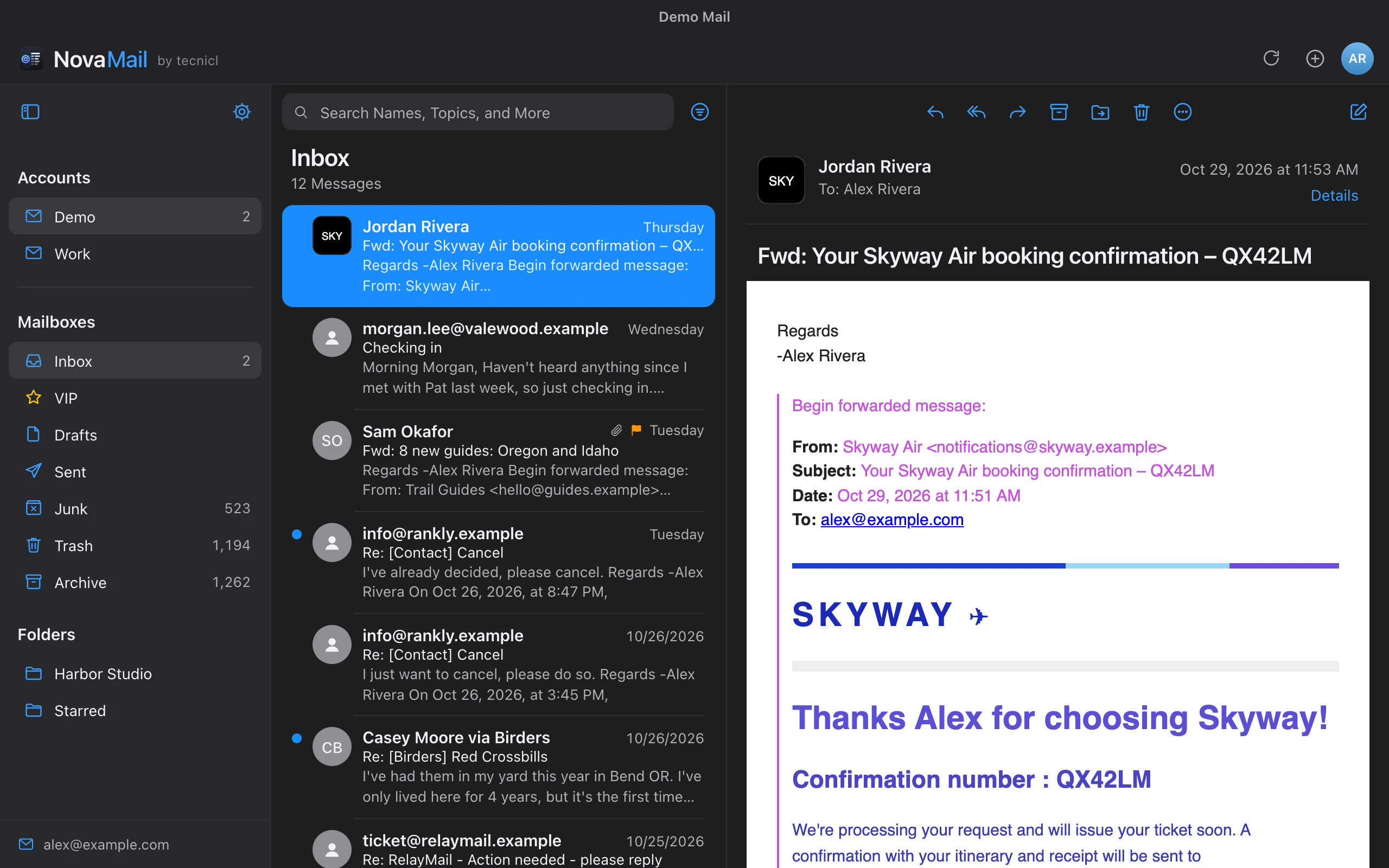
NovaMail in dark mode with accounts and mailboxes in the sidebar, the Inbox message list, and an airline booking email open in the reader

AT HOME WITH YOUR MAIL

iCloud Mail Gmail Google Workspace Microsoft 365 Exchange Online Outlook.com Any IMAP server

WHY ANOTHER MAIL CLIENT?

Because your mail deserves
better than “good enough.”

Most mail apps make you choose: the one that’s great with iCloud, the one that’s great with Gmail, or the one your office installed. NovaMail is built so you don’t have to.

EVERY ACCOUNT

Every provider, done properly.

Other apps treat one provider as home and the rest as guests. NovaMail speaks each one’s language: Google sign-in, Microsoft Graph, and flags stored the way Apple Mail and Outlook store them, so your phone sees exactly what you did.

SPEED

Fast is the whole point.

Mailboxes and messages are cached, so they open the moment you click. Push mail runs for every account, not just the one on screen. You spend your time on mail, not on spinners.

CALM

An inbox that sorts itself.

Turn on the Smart Inbox and the people who matter come first, while receipts and newsletters gather into tabs you clear in one click. Prefer a plain list? It’s yours by default.

SAFETY

Built to distrust email.

Messages are cleaned and shown in a sandbox with scripts off, brand logos appear only for verified senders, and your passwords live in the system keychain. Safety is the default, not a setting.

CHOICE

AI that waits to be asked.

No forced assistant and no mail quietly sent off for analysis. When you want a summary or a draft, bring your own key, a tool you already use, or a model running on your own computer.

CRAFT

Made for people who live in mail.

Keyboard shortcuts for everything, native menus, your choice of reading and writing fonts, colored quotes, and dozens of small details that add up to an app you enjoy opening.

ACCOUNTS

Every account you use.
The way each one works best.

Each provider gets a connection built for it: its own sign-in, its own folders, and its own way of handling sent mail and flags.

AVAILABLE NOW

01 / APPLE

iCloud Mail.
Like Apple Mail.

  • iCloud Mail with an app-specific password, the way Apple Mail connects on other platforms
  • Colored flags stored the way Apple Mail stores them, so they match on your iPhone and Mac
  • VIP senders with their own mailbox

Apple has no public mail API, so NovaMail uses secure IMAP and SMTP, exactly as Apple recommends for other mail apps.

AVAILABLE NOW

02 / GOOGLE

Gmail and Workspace.
Sign in with Google.

  • Gmail
  • Google Workspace your admin may need to allow the app
  • Gmail’s own mailboxes Sent Mail, All Mail and Starred appear as normal mailboxes
  • No duplicate Sent copies Gmail files sent mail itself, so NovaMail leaves it alone

Secure Google sign-in, the same approach Apple Mail and Thunderbird use, or an app password if you prefer.

AVAILABLE NOW

03 / MICROSOFT

Microsoft 365.
No password stored.

  • Microsoft 365 and Exchange Online
  • Outlook.com, Hotmail and Live
  • Outlook color categories flag colors carry over to Outlook

NovaMail talks to Microsoft through Microsoft Graph, Microsoft’s current recommended mail API, with sign-in in your own browser.

Plus any IMAP server: Fastmail, your web host, or your company’s own mail server.

FAST BY DESIGN

Open instantly.
Stay current.
Never wait.

NovaMail shows what it already has right away, then quietly brings in anything new in the background.

New mail, as it arrives.

Every iCloud, Gmail and IMAP account keeps a push connection open on its Inbox, with automatic reconnects. Unread badges update in the sidebar and the Dock, and you’re notified of mail you aren’t already looking at.

Switch mailboxes instantly.

Folders, message lists and opened messages are cached, and each mailbox’s first page is saved to disk, so your mail is on screen the moment NovaMail opens.

Only what’s changed.

Refreshes download just the new arrivals and flag changes, and folder counts update on a separate connection so they never slow down opening a mailbox.

AI, ONLY IF YOU WANT IT

Use AI when it helps.
Ignore it when it doesn’t.

NovaMail works completely without AI. It’s off until you turn it on, and nothing is sent to an AI provider unless you choose one.

Summaries in a click.

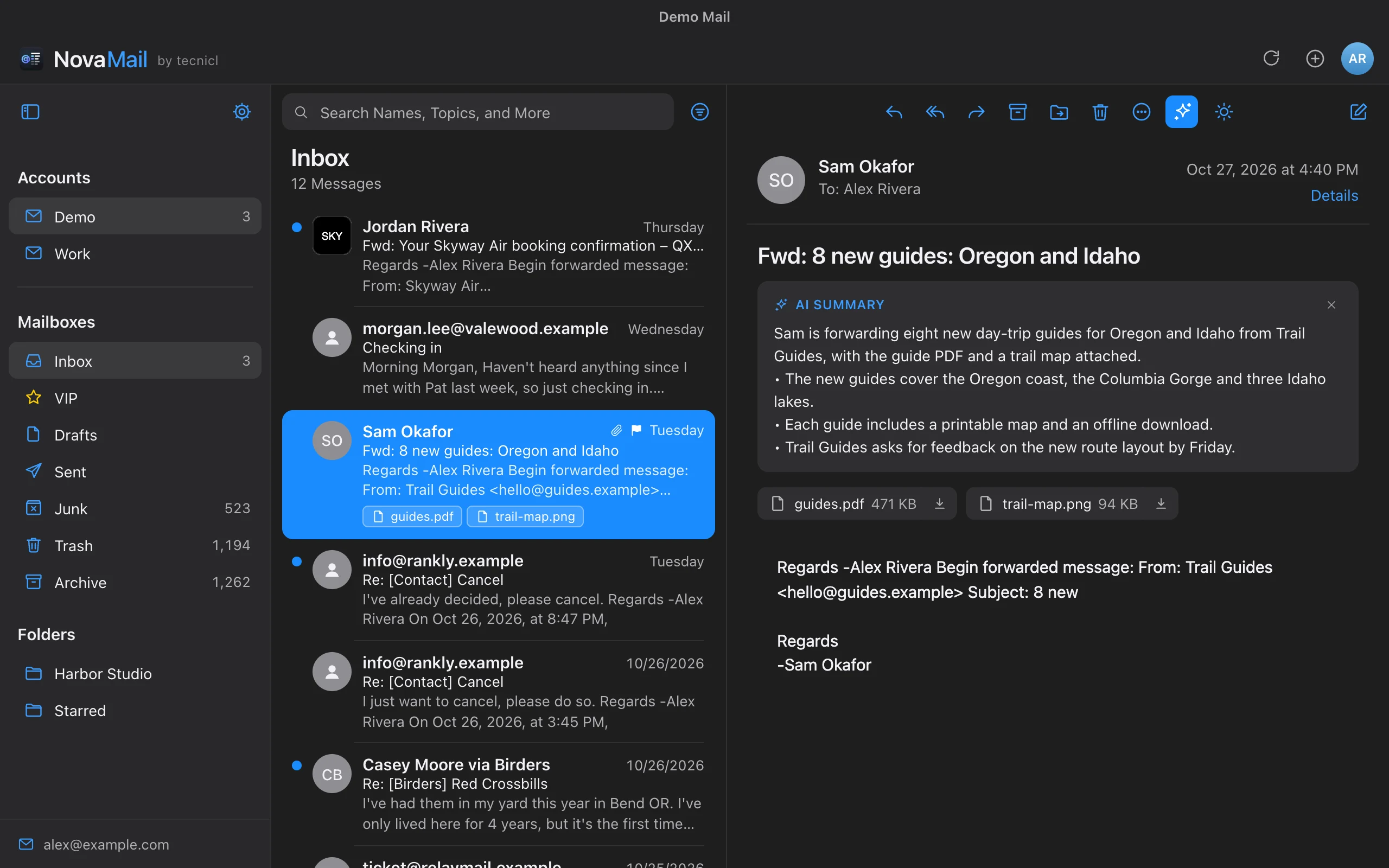
The sparkle button sums up a message, or a whole conversation, with the key points, dates and anything you’re asked to do.

Drafts in your voice.

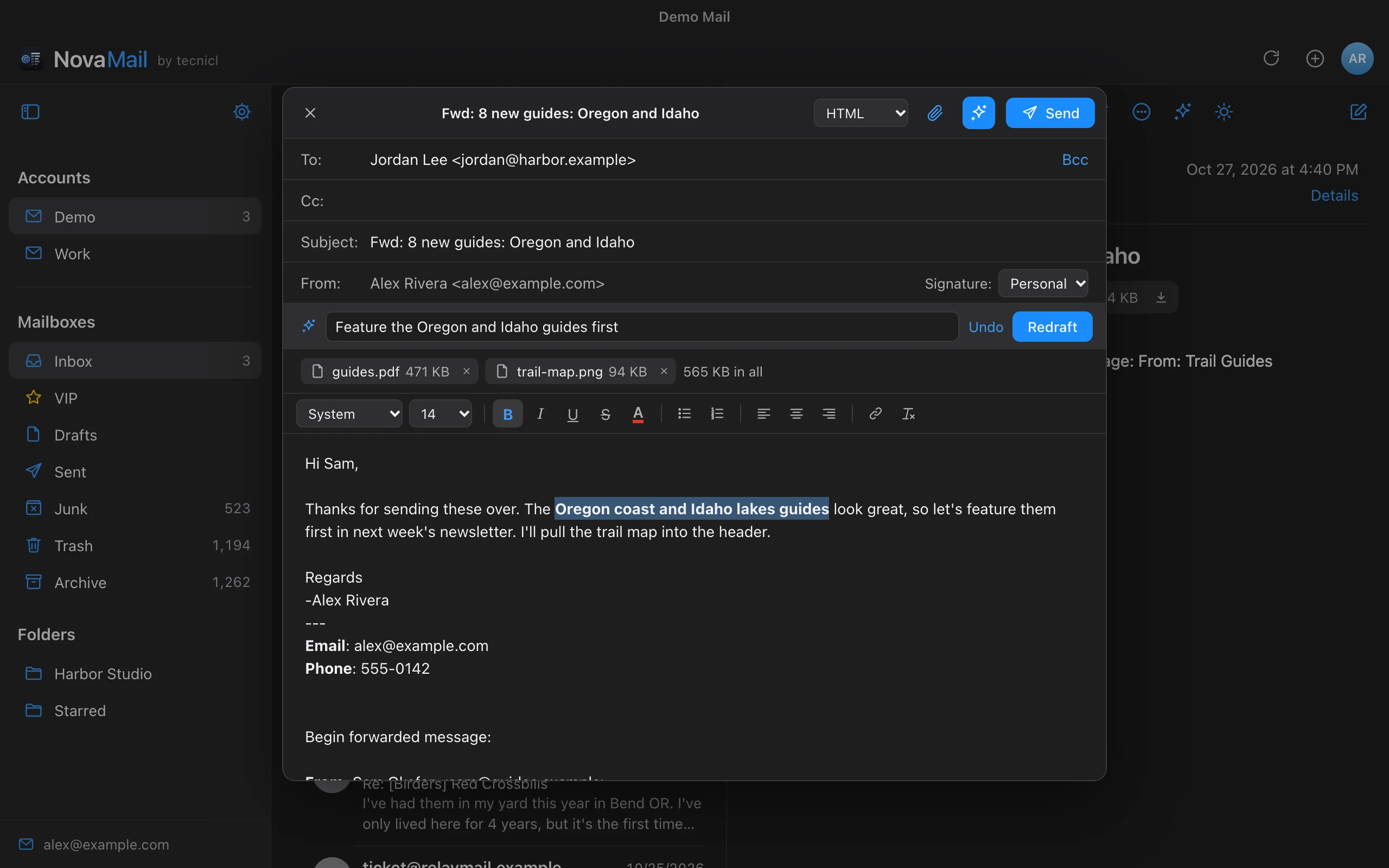
Say what you want to say, or jot a few notes, and AI writes the reply, forward or new message above your signature. Redraft it or undo it.

Your choice of model.

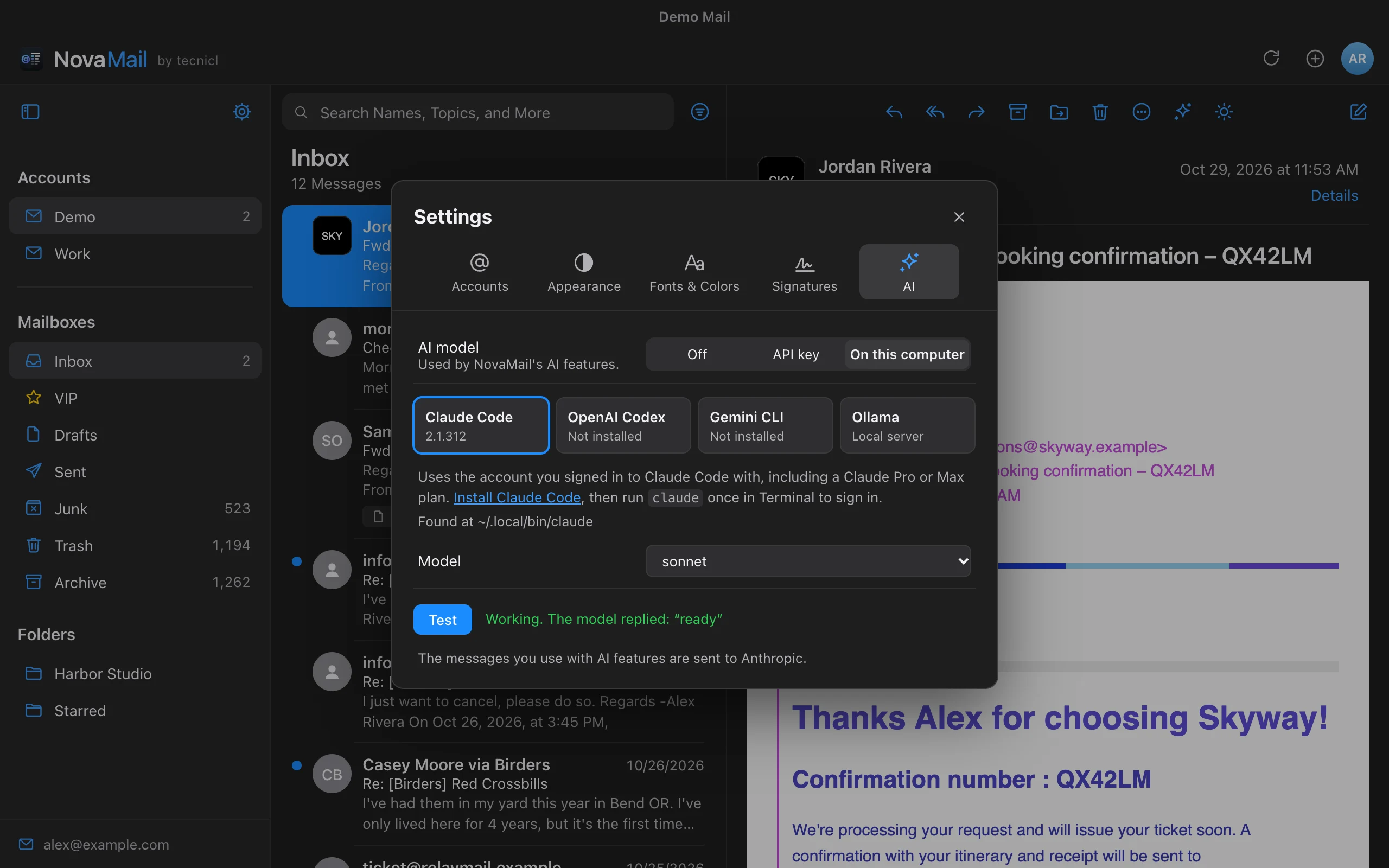
Use your own Anthropic, OpenAI or Google key, or the Claude Code, Codex or Gemini CLI account you already have, including a Claude or ChatGPT plan. Or run models locally with Ollama.

WINDOWS & LINUX / IN TESTING

Help shape NovaMail
on your platform.

NovaMail runs on macOS today, and the same code builds for Windows and Linux. We’re looking for testers to put it through their everyday mail on both platforms.

Experimental Windows builds. These are untested: they haven’t been run on Windows yet, so expect rough edges, and please tell us what breaks. They aren’t signed yet either, so Windows will warn you before installing. Choose More info, then Run anyway.

Experimental and untested · Build 83 · x86 (4 MB) for most Windows 10 and 11 PCs with Intel or AMD chips · Arm (4 MB) for Windows 11 on Snapdragon PCs like the Surface Pro 11.

TESTERS WANTED

Use Windows or Linux?
We’d love your feedback.

Try your real accounts and workflows on the platform you use.

Become a tester ↗

BUILT FOR THE MAIL YOU GET

A mail app with
real depth.

Everything you do with mail every day, and the details that make it pleasant.

✉

Read mail as it was meant to look

Rich HTML mail shows with its images and layout intact, in a sandbox with scripts turned off. Simple notes follow dark mode, and attachments open with a double-click.

Safe HTML · Dark mode · Attachments
≡

Follow the whole conversation

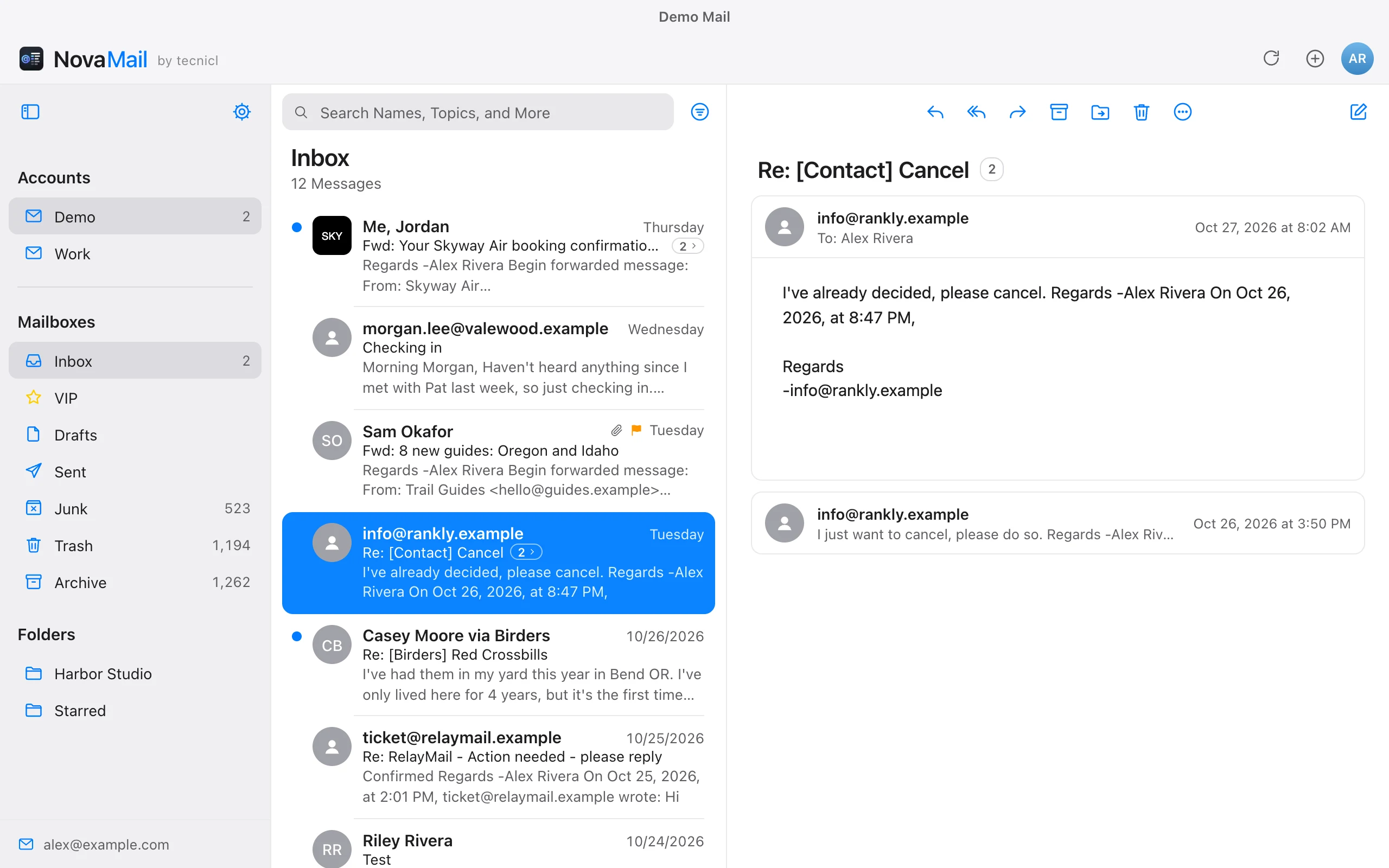
Optionally group mail into conversations, with your own replies from Sent included. Read the whole thread in one place, or expand it in the list to open any single message.

Conversations · Your replies · Expand in list
⚑

Flag it, pin it, find it

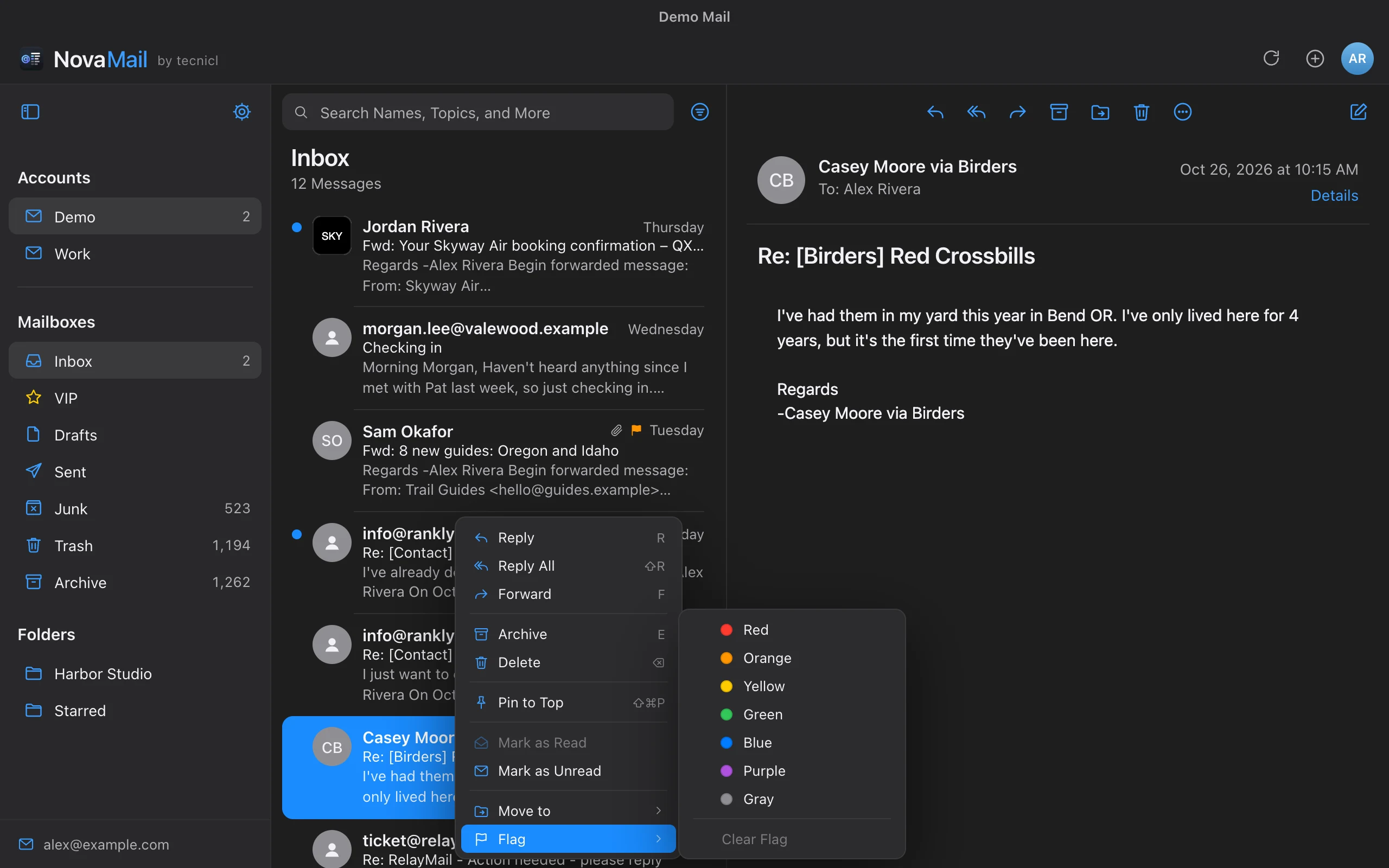
Seven flag colors that match Apple Mail and Outlook. Pin messages to the top of a mailbox for later, and filter by any mix of Unread, Flagged and Pinned.

Flag colors · Pin to Top · Filters
▤

A Smart Inbox, if you want one

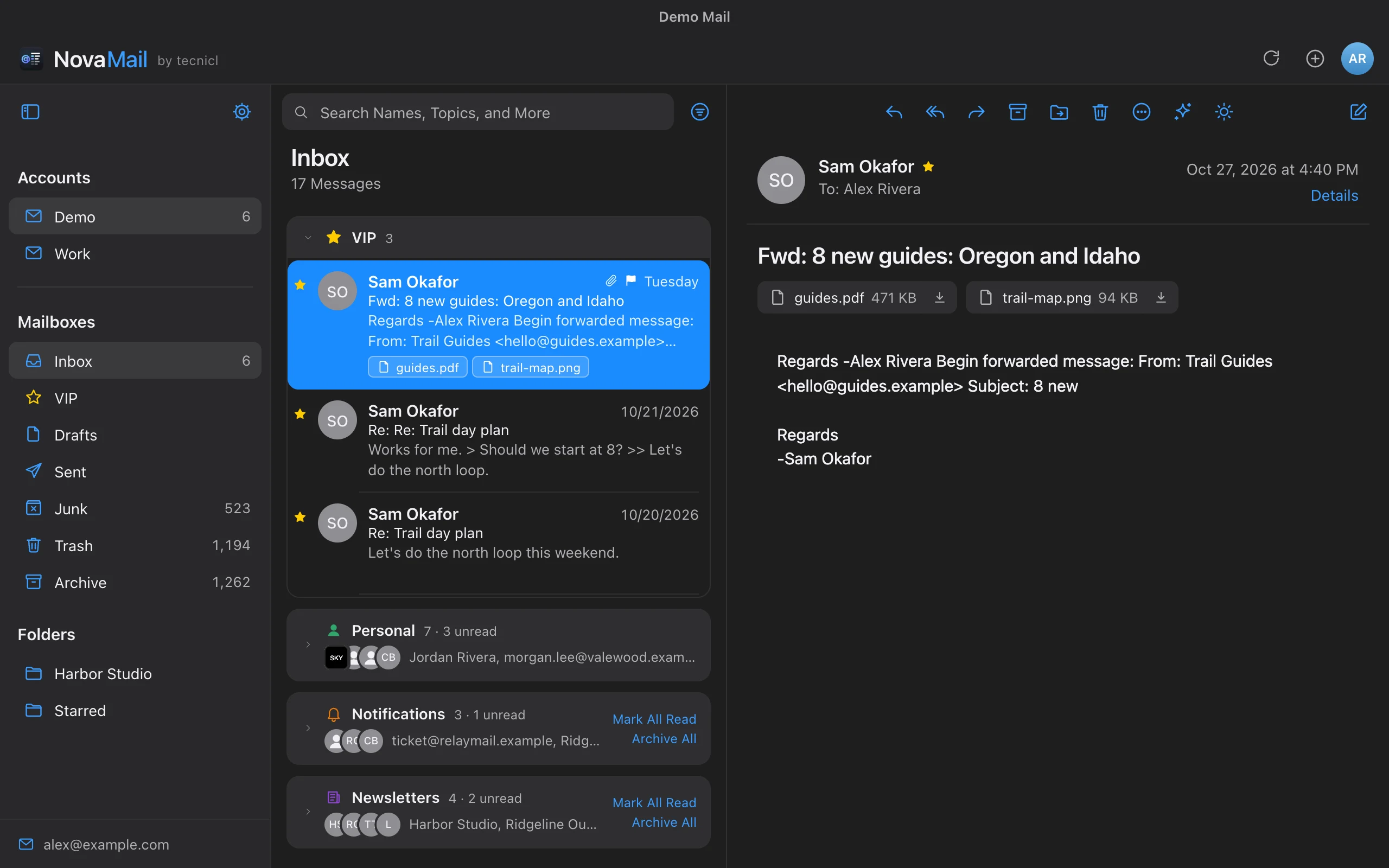
Turn it on to see VIPs and people first, with receipts, alerts and newsletters gathered into tabs you can mark read, archive or delete all at once. Each section is a tab of its own.

VIP · Personal · Notifications · Newsletters
✎

Write it your way

A formatting bar for fonts, colors, lists and links, or plain text when you’d rather. Attach files, keep a library of signatures, and forward with the original’s attachments.

Formatting · Plain text · Attachments · Signatures
Aa

Make it easy on the eyes

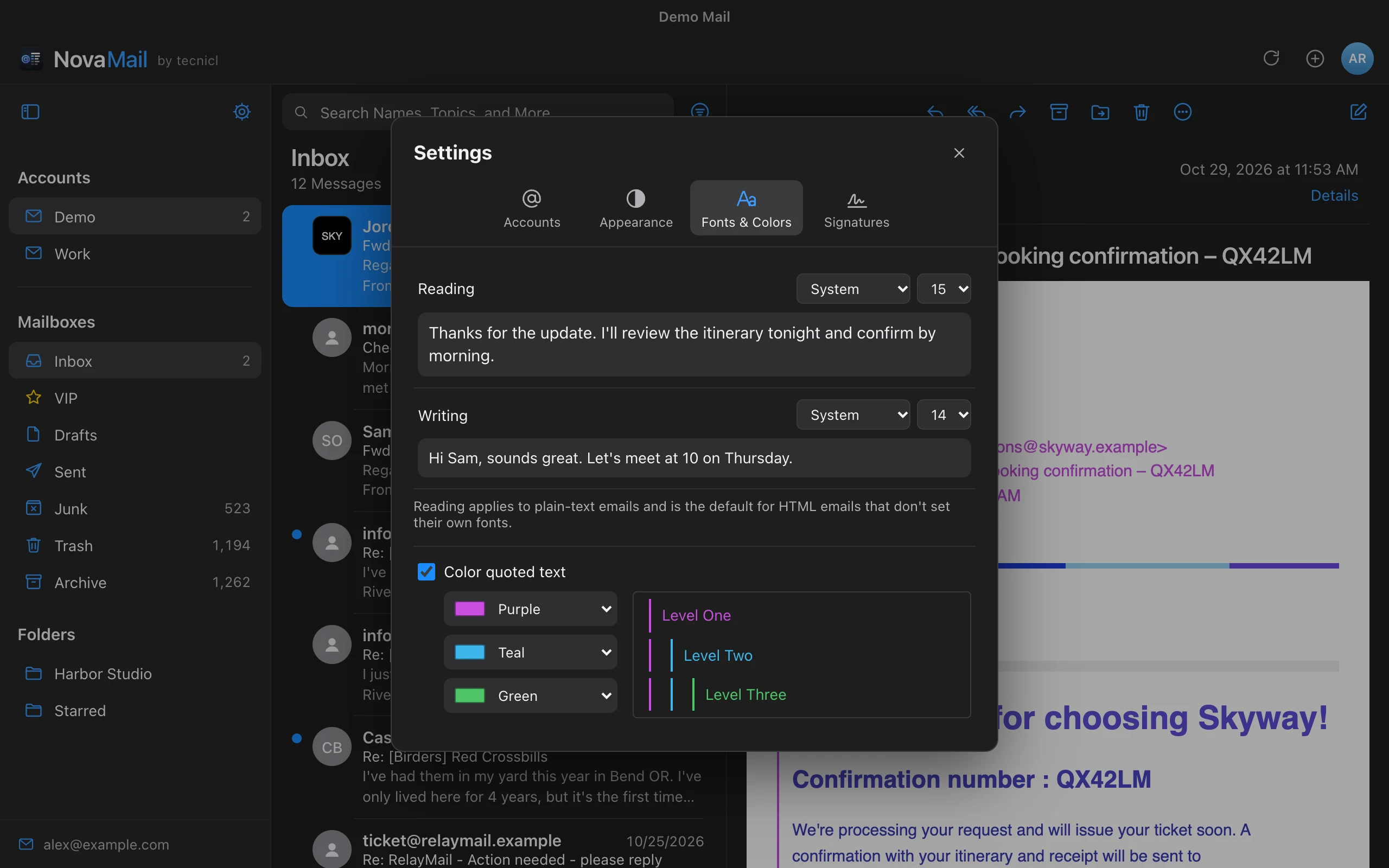
Choose separate reading and writing fonts and sizes, color each level of quoted text, and pick light, dark or system appearance, with an optional light reading pane in dark mode.

Fonts · Quote colors · Light & dark
⌘

Keep your hands on the keys

Move with the arrow keys or j and k, reply with r, forward with f, archive with E, and send with Command-Return. A full native menu bar puts every action and shortcut in reach.

Shortcuts · Native menus · Zoom
◆

Logos you can trust

Brands’ official logos appear beside their mail only when your mail provider has verified that it really came from them, so forged mail can’t borrow a familiar face.

Verified senders · BIMI · DMARC
✳

AI, on your terms

AI is there if you want it, and never required. Summarize a conversation or draft a reply with your own API key, or with Claude Code, Codex, Gemini CLI or Ollama on your computer.

Summaries · Drafts · Your own model
◈

Your accounts, thoughtfully handled.

Passwords and sign-in tokens live in your system keychain, never in a plain file. Google and Microsoft sign in through your own browser, and every connection is encrypted.

THE FULL PICTURE

Every feature,
in one place.

78 features across 11 areas. Use your browser’s Find command to look for one.

01

Accounts and sign-in

8
  • iCloud Mail

    Connects with an app-specific password, the way Apple Mail does on other platforms.

  • Gmail and Google Workspace

    Sign in with Google in your browser, or use an app password.

  • Microsoft 365, Exchange Online and Outlook.com

    Microsoft Graph, Microsoft's current mail API, with sign-in in your own browser. No password is stored.

  • Any IMAP server

    TLS or STARTTLS, with the likely imap. and smtp. servers filled in for you.

  • As many accounts as you like

    Each with its own mailboxes, unread badge and optional label.

  • Secrets in your keychain

    Passwords and sign-in tokens live in the macOS Keychain, Windows Credential Manager or Linux Secret Service.

  • Edit an account

    Change its description, your name as recipients see it, and its password, which is checked with the server before it's saved. Google and Microsoft accounts can sign in again when their sign-in expires.

  • Send from your other addresses

    iCloud aliases and custom domains, Gmail's Send mail as, and Microsoft aliases, found for you where Gmail and Microsoft allow it. Pick one in the From menu or make it the default; replies come back to it.

02

Speed and sync

6
  • Push mail for every account

    A push connection on each Inbox, not just the one on screen, with automatic reconnects.

  • Instant mailbox switching

    Folders, lists and opened messages are cached, and each mailbox's first page is saved to disk for an instant start.

  • Incremental refresh

    Only new arrivals and flag changes are downloaded.

  • Unread badges and notifications

    Per-account badges in the sidebar, a Dock badge, and a notification for new mail you aren't looking at. Choose which mail notifies: all of it, VIPs only, or by Smart Inbox section, with an optional sound.

  • Keeps running when you close the window

    On a Mac, the close button hides NovaMail's window instead of quitting, so mail and notifications keep coming. Click the Dock icon to bring it back; Quit closes it for good.

  • Polite with busy servers

    Stays within Microsoft's limits and retries automatically when a server asks it to wait.

03

Message list

9
  • Previews you choose

    One, two or three lines of message text under each item.

  • Combinable filters

    Show only Unread, Flagged or Pinned mail, matching any or all of them.

  • Pin to Top

    Keep messages in a Pinned section above the rest of the mailbox.

  • Conversations

    Group replies with the messages they answer, including your own replies from Sent. Expand one right in the list, or have them all open by default.

  • Conversation marker

    With conversations off, a colored bar marks every message in the selected message's conversation.

  • Attachments at a glance

    Attachment names appear under each message, with the icon of the app that opens them. Double-click to open.

  • Actions on the selected message

    Pin, Archive, Delete, Reply and Reply All buttons right on the message you've selected in the list.

  • Multi-select

    Shift-click a range, Command-click to pick and choose, or select everything.

  • Server-side search

    Search names, subjects and more in the open mailbox, and clear it with one click.

04

Smart Inbox

8
  • Off until you turn it on

    Your Inbox stays exactly as it is unless you choose the Smart Inbox in Settings.

  • VIP and Personal first

    VIPs at the top, then people you write to and conversations you've replied in.

  • Notifications and Newsletters

    Receipts, alerts and codes in one tab; mailing lists and marketing in another.

  • Clear a tab at once

    Mark All Read, Archive All or Delete All, with a count to confirm first.

  • A tab for each section

    Pinned, VIP, Personal, Notifications and Newsletters each get a tab above the list, scrolling sideways when they don't all fit. NovaMail remembers the one you were on.

  • Why it's here

    Hover over a message to see why it's in its section.

  • Move a sender

    Right-click to put a sender in VIP, Personal, Notifications or Newsletters for good.

  • Managed in Settings

    Add and remove VIPs, and review the senders you've placed.

05

Reading

8
  • Safe HTML

    Mail is cleaned and shown in a sandbox with scripts disabled. Links open in your browser.

  • Dark mode that respects senders

    Simple messages follow dark mode; designed newsletters stay on white, as their senders intended.

  • White background for one message

    In dark mode, show just the message you're reading on white.

  • Your reading pane, your way

    Show every message in a conversation, or only the one you selected.

  • Mark as read when you choose

    Immediately, after a few seconds, or never. Moving on sooner leaves the message unread.

  • Colored quotes

    A color for each level of quoted text, on HTML and plain-text mail.

  • Reading font and size

    Separate from your writing font.

  • Show Raw Message

    The message source exactly as the server stores it, with Copy and a search field that highlights and steps through every match.

06

Brand logos

3
  • Verified brand logos

    Official logos (BIMI) appear only when your mail server recorded a DMARC pass for the sender, so forged mail can't borrow one.

  • Website icons as a fallback

    Verified senders without a logo get their own website's icon, fetched from their site, never a third-party service.

  • People stay people

    Senders at personal mail providers like gmail.com and icloud.com show initials, not the provider's logo.

07

Writing

11
  • Reply, Reply All and Forward

    Threaded properly on every account type.

  • A window for each message

    New messages, replies and forwards open in their own window. Move it anywhere, even outside NovaMail's window or onto another display, and keep several going at once.

  • HTML or plain text

    Choose a default, and switch any message. Plain text is sent as real plain text with quoted lines.

  • Formatting bar

    Font, size, bold, italic, underline, strikethrough, color, lists, alignment and links.

  • Paste and Match Style

    Paste text without its fonts, colors or links, so it matches the rest of your message. From the Edit menu or the right-click menu, or ⌥⇧⌘V on a Mac, Ctrl+Shift+V on Windows and Linux.

  • Signatures

    A library of rich-text signatures, a default for each account, and a picker in every message. Import one from an HTML file.

  • Drafts saved as you write

    Messages you're writing are saved to your Drafts folder on the server as you type, so nothing is lost if you close the window or quit. Open a draft to pick up where you left off.

  • Writing font and size

    Used in the compose window and for the messages you send.

  • Address suggestions

    To, Cc and Bcc suggest people as you type: from Contacts on a Mac, Gmail and Microsoft contacts on Windows and Linux, people in your mail from the past year, and people you've written to. Each source has its own switch.

  • Dark mode compose

    Write on dark when you read on dark; recipients still get readable colors.

  • Always show Bcc and From

    Show the fields you use, hide the rest.

08

Attachments

5
  • Attach files

    Up to 25 MB per message, which most mail servers accept.

  • Forward with attachments

    Forwarding keeps the original's attachments; remove any you don't want.

  • Open or save

    Double-click to open in the app that handles the file, or save it to Downloads.

  • App icons

    See at a glance whether it's a PDF, a spreadsheet or a photo.

  • Calendar invitations

    An invitation shows its event's title, time and place; click it to add it to Calendar. Cancelled events are marked as cancelled.

09

Organizing

7
  • Archive with one key

    Press E. Uses your account's Archive mailbox, Gmail's All Mail, or a new Archive folder.

  • Seven flag colors

    Stored the way Apple Mail stores them, and as Outlook color categories on Microsoft accounts.

  • Move, delete, mark read and unread

    For one message, a conversation, or a whole selection.

  • New folders

    Create a folder on the server, at the top level or inside another folder, from the sidebar or from Move to, which files the message there in the same step.

  • Empty Trash and Junk

    One button in Trash and in Junk or Spam permanently deletes everything there, including older mail not loaded yet, after asking first.

  • VIP senders

    A VIP mailbox for the people who matter most. Click the star beside a sender's name in an open message, or right-click a message in the list, to add or remove them.

  • Right-click for everything

    Reply, archive, pin, flag, move and more from any message.

10

AI, only if you want it

7
  • Off until you turn it on

    NovaMail works completely without AI. Nothing is sent anywhere unless you choose a model.

  • Your own API key

    Anthropic, OpenAI, Google Gemini or any OpenAI-compatible server. Keys stay in your keychain.

  • An AI tool on your computer

    Claude Code, OpenAI Codex or Gemini CLI, using the account you already signed in to them with, or Ollama with no account at all.

  • AI summaries

    A short summary of a message or a whole conversation, with the key points, dates and requests.

  • Draft replies and forwards

    Say what you want to say, or jot a few notes, and AI writes it above your signature and the quote. Redraft or undo.

  • Draft new messages

    Describe the message and get a draft and a suggested subject.

  • Careful with what it reads

    Email is treated as untrusted text, and command-line tools run with their own tools turned off.

11

Desktop

6
  • Native menus and shortcuts

    A full menu bar with standard shortcuts, plus j and k, r, f and E in the list.

  • Light, dark or system appearance

    With an optional light reading pane in dark mode.

  • Resizable panes and zoom

    Remembered between launches.

  • Settings in its own window

    Settings opens in a window of its own. Move it anywhere, even onto another display, and changes apply to your mail as you make them.

  • Automatic updates

    NovaMail lets you know when a new version is out and installs it in one click, after checking it's signed by us. Check for Updates any time from the menu.

  • macOS today, Windows and Linux next

    One codebase for all three.

ON THE ROADMAP

What’s coming next.

Features planned for NovaMail and not available yet. Each is a tracked piece of work; order and timing may change.

PLANNED · ACCOUNTS

Fastmail, with JMAP

Fastmail as a first-class account over JMAP, the modern mail standard: faster sync, push for every mailbox, and contacts.

PLANNED · ACCOUNTS

Zoho Mail

Zoho Mail as its own account type, with the right servers for your region and Zoho sign-in.

PLANNED · WRITING

Undo Send

A few seconds after you click Send to change your mind, with the time up to you.

PLANNED · WRITING

Schedule Send

Write now, deliver later: tomorrow morning, Monday, or any date and time.

PLANNED · ORGANIZING

Set Aside & Snooze

Park mail in a drawer for when you have time, or snooze it until it should come back to the top of your Inbox.

PLANNED · ORGANIZING

Follow-up Nudges

A gentle reminder about messages you haven't answered, and ones you sent that haven't had a reply.

PLANNED · MESSAGE LIST

Unified Inbox

All your accounts' Inboxes together in one list, with each message's account at a glance.

PLANNED · READING

One-click Unsubscribe

An Unsubscribe button on newsletters, using the standard link senders include, so you never hunt for it.

PLANNED · ORGANIZING

Block Sender

Stop hearing from someone: their mail goes straight to Junk, and you can unblock them anytime.

PLANNED · PRIVACY

Privacy Protection

Remote images and tracking pixels stay blocked until you choose, so senders can't tell when you open their mail.

PLANNED · PRIVACY

Email Aliases

Give out a different address to every site and still read everything in one place.

PLANNED · PRIVACY

Encrypted Mail

Sign and encrypt messages with S/MIME or OpenPGP, and read encrypted mail you receive.

PLANNED · ORGANIZING

Rules

Automatically file, flag, mark or forward mail that matches the conditions you set.

PLANNED · WRITING

Templates

Save replies you send often and drop them into any message, with placeholders for names.

PLANNED · DESKTOP

Command Palette

Press ⌘K to do anything (move, flag, snooze, switch accounts) without touching the mouse.

PLANNED · MESSAGE LIST

Advanced Search

Search with from:, to:, has:attachment and dates, across every mailbox, and save searches you use often.

PLANNED · READING

Calendar Invites

Accept, decline or tentatively accept meeting invitations right in the message.

PLANNED · ATTACHMENTS

Large Attachments

Send files too big for email by sharing them as a link instead.

PLANNED · SPEED AND SYNC

Offline Mode

Read, search and write mail on a plane; NovaMail syncs everything when you're back online.

PLANNED · PRIVACY

Screener

First-time senders wait for a yes or no before they reach your Inbox.
CARE YOU CAN COUNT ON

Fast to use.
Careful underneath.

Robustness lives in the details: how mail is shown, how your accounts are kept, and how NovaMail behaves when a server is busy.

READING

Mail can’t run code.

HTML mail is cleaned before it’s shown, then displayed in a sandbox with scripts disabled. Links always open in your own browser.

IDENTITY

A logo means it’s really them.

Brand logos only appear when your mail server records that the message passed DMARC for the sender’s domain. Logos are cached and checked again regularly.

ACCOUNTS

Secrets stay in the keychain.

Passwords and sign-in tokens are stored in your operating system’s credential store. Microsoft accounts never store a password at all.

SYNC

Changes that match everywhere.

Flags, read state, moves and archives are made on the server, in the form each provider understands, so your phone and other mail apps see the same thing.

RELIABILITY

Polite with busy servers.

NovaMail stays within Microsoft’s limits and automatically waits and retries when a server asks it to slow down. Push connections reconnect on their own.

FOUNDATION

Built as a native desktop app.

A small, fast native shell with a Rust mail engine and modern, built-in encryption. Automated tests run the sync logic against a real mail server.

70features
4kinds of account
7flag colors
0passwords stored for Microsoft

A FEW GOOD QUESTIONS

Good to know.

Which mail accounts can I use?

iCloud Mail, Gmail and Google Workspace, Microsoft 365, Exchange Online and Outlook.com, and any mail provider that offers IMAP, which is nearly all of them.

Can I use more than one account?

Yes. Add as many accounts as you like. Each gets its own mailboxes in the sidebar, its own unread badge, and push mail, whether or not it’s the one on screen.

Do I have to use AI?

No. AI is there if you want it, but NovaMail never requires it. It’s off until you choose a model in Settings → AI, and until then nothing is sent to an AI provider. Every other feature works the same either way.

Which AI can I use?

Your own API key for Anthropic, OpenAI, Google Gemini or any OpenAI-compatible server, or an AI tool already on your computer: Claude Code, OpenAI Codex or Gemini CLI with the account you signed in to them with, or Ollama running models locally. The messages you use with AI features are sent to the provider you choose; with Ollama they stay on your computer.

Where are my passwords kept?

In your operating system’s credential store: the macOS Keychain, Windows Credential Manager, or the Linux Secret Service. Microsoft accounts sign in through your browser and NovaMail never sees the password.

Will my flags show up in Apple Mail and Outlook?

Yes. On iCloud and IMAP accounts, flag colors are stored the way Apple Mail stores them. On Microsoft accounts they use Outlook’s color categories. Gmail can’t store flag colors, so flags there are uncolored.

Is HTML mail safe to open?

NovaMail cleans HTML mail before showing it and displays it in a sandbox with scripts disabled, so a message can’t run code. Links open in your browser rather than inside the app.

How does NovaMail fit into a macOS workflow?

NovaMail has a native menu bar with standard shortcuts, a Dock badge for unread mail, system notifications, keychain integration, and light, dark or system appearance.

MAKE ROOM FOR WHAT MATTERS

Let your inbox get out of the way.

Download NovaMail for Mac ↓